
Skip to content
Ship To The Moon
  • Services
    • Dropshipping
    • Branding
    • Print on Demand
    • Buy Stock
    • Product Photography
    • UGC Service
    • Super Product Line for USA
  • Integrations
    • Shopify
    • Woocommerce
    • Etsy
    • API
  • Why STTM
    • About
    • Global Warehouse
    • Unbeatable Prices
    • Stable Logistics
  • Resources
    • Blog
    • Help Center
    • Video Tutorials
    • Affiliate Program
    • Dropshipping Guide
    • FAQ
    • Toolbox
    • Products
  • Sign In
  • Register
LogoLogo
  • Services
    • Dropshipping

      Hassle-free dropship fulfillment

      Branding

      Dropshipping with private label

      Print on Demand

      Custom on-demand printing

      Buy Stock

      Bulk inventory procurement

      Product Photography

      Professional product visuals

      UGC Service

      Authentic UGC creation

      USA Super Product Line

      Dropship regulated products to US

  • Integrations
    • Shopify

      Dropshipping store speed-build

      Woocommerce

      WordPress dropshipping depth

      Etsy

      Handmade dropshipping niche

      API

      Custom dropshipping sync

      View More Integrations
  • Why STTM
    • About Us

      Learn about Ship To The Moon

      Global Warehouse

      Localized shipping, super fast fulfillment

      Unbeatable Prices

      Beat rivals, cut costs via unbeatable pricing

      Stable Logistics

      Delivery reliability to ditch shipment worries

  • Resources
    • Blog

      Dive into Dropshipping wisdom

      Help Center

      Fix roadblocks fast

      Video Tutorials

      Master workflows with videos

      FAQ

      Answers for serious dropshippers

      Affiliate Program

      Turn shares into cash

      Dropshipping Guide

      How to start dropshipping with STTM

      Toolbox

      Dropshipping calculators and tools

      Products

      Explore dropshipping catalogue

Sign In
Get Started
LogoLogo
  • Last Updated: June 25, 2026

How to Add Users?

  • Home /
  • Documents /
  • How to Add Users?

Documentation Tree

Getting Started
How does Ship To The Moon work?
Office business hours
How to Create a Ship To The Moon Account
What languages are supported?
What Is a Dropship Order?
Dashboard & Account
How to Reset Your Password?
How to Define Multiple Roles?
How to Add Users?
Product & Inventory Management
How to Source Products?
How to Choose & Publish a Product to Your Store?
How to Track Inventory?
Do You Support Product Branding / Customization?
Billing & Payments
How do I add funds to my account?
How much does Ship To The Moon cost?
Do You Support Multi-Currency Settlement?
What Payment Methods Do You Support?
Order & Fulfillment
How is the shipping rate calculated?
Where is your warehouse located?
Where do your products ship from?
How long is the processing time?
Refund and Replacement Policy Guide
How to Start AutoFulfillment in STTM?
What is Auto Fulfillment?
How to Export Invoices?
How to Sync Orders?
What are the estimated shipping times?
Integration Guides
How to Connect Your Shopify Store?
How to Connect Your WooCommerce Store?
How to Connect Your Etsy Store?
How to Connect Other Stores?
Affiliate Program
How to Join the Affiliate Program?
What is the commission rate for affiliates?
How to Withdraw Your Commission?

You can invite team members to your Ship To The Moon (STTM) account and assign custom roles to manage their access permissions.

Roles are created in advance using the Roles feature.

Step 1: Access Account Management

  1. Log in to your STTM dashboard.
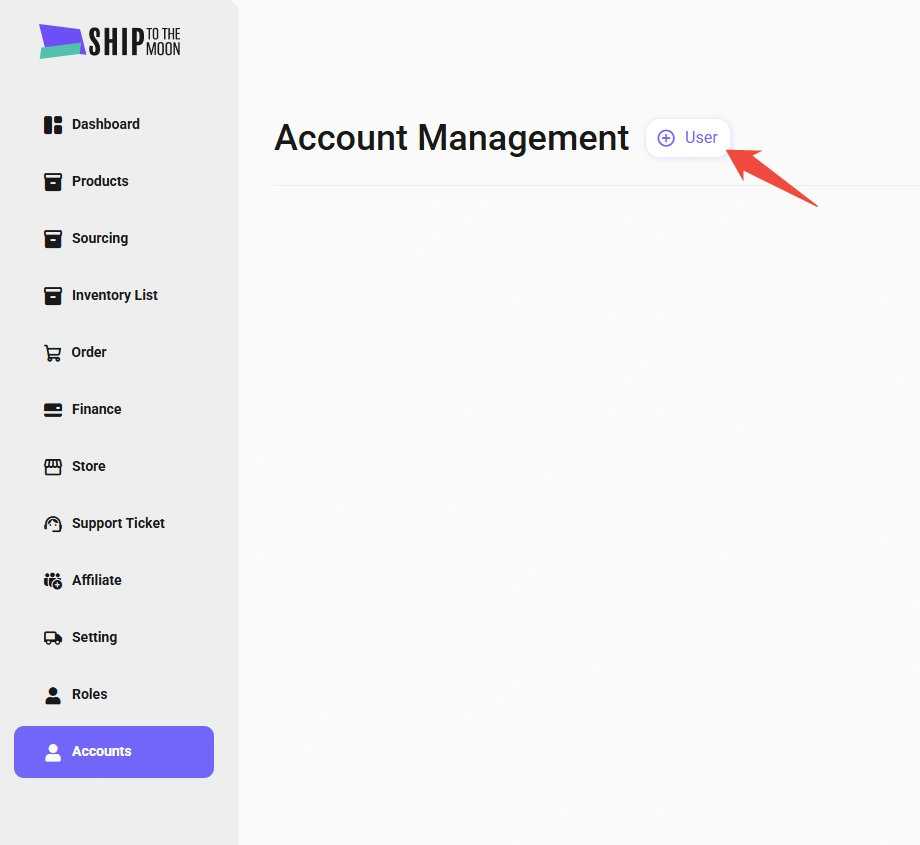
  2. Click Accounts in the left sidebar.

Step 2: Create a New User

On the Account Management page:

  • Click the + User button (top-right).
How to Add User

Step 3: Enter User Information

In the pop-up form, complete the required fields:

  1. Store Name*: Enter the user’s display name (e.g., “John – Support”).
  2. Email*: Use their work email (used for login).
  3. Password*: Set a temporary password (they can reset it later).
  4. Remark*: Add notes (e.g., “Customer Support Lead”).
  5. Choose The Store*: Select the store(s) they’ll access (if managing multiple stores).
  6. Role*: Pick a pre-created role (e.g., “Support Agent,” “Finance”) to define their permissions.
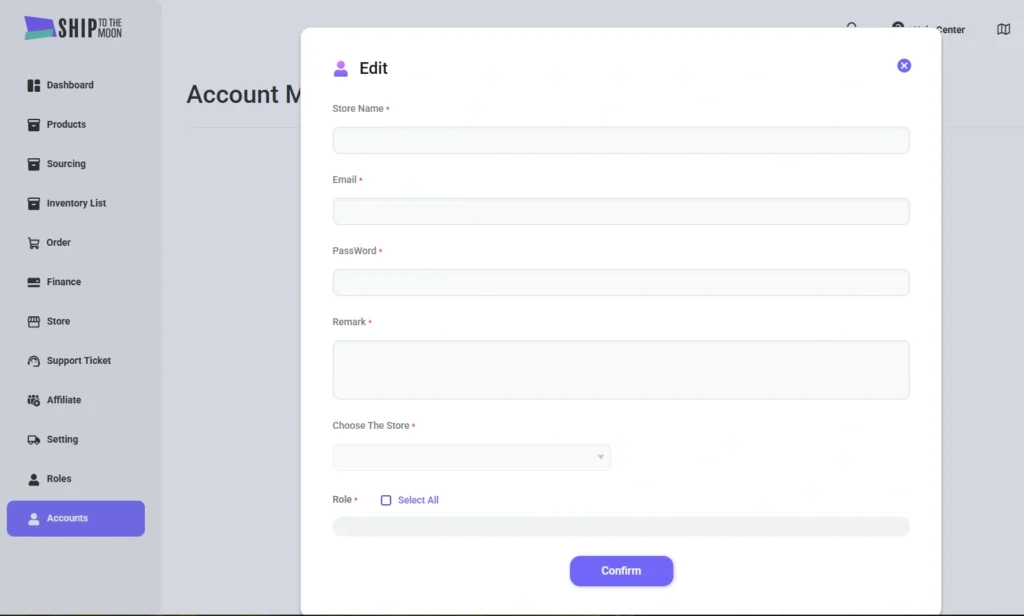
How to Add User 2

Step 4: Confirm & Save

Click Confirm to create the user. The new user will receive login credentials via email and can access the dashboard based on the assigned role and permissions.

Key Notes

  • Role setup is required first: Make sure roles are created first (see How to define multiple roles).
  • Store access depends on integration: If no stores appear in the selection list, check whether your store is connected under: Store → Integrations

FAQs

  1. Can I edit a user’s details later?

    Yes. You can update user details, including name, email, role, and store access from the Account Management list.

  2. What if a user forgets their password?

    They can reset it via the “Forgot Password” option on the login page, or an admin can reset it manually in their account settings.

  3. How many users can I add?

    No. You can add unlimited users based on your team needs.

Streamline teamwork by giving the right access to the right people! Need help? Use the dashboard chat.

Your Dropshipping Success Starts Here!

No extra fees

Worry-free global shipping

7/24 Support

Launch your dropshipping journey today – Your first sale is closer than you think.

Get Started Now

Subscribe for Dropshipping Insights

Get the latest trends, platform updates, and exclusive tips to boost your sales—delivered straight to your inbox.

Logo
Global Ecommerce Shipping & Supply Solutions

Achieve higher profitability with the lowest cost for every order without compromising quality.

sttm-trustpilot-scores
Connect with us
Youtube Facebook Instagram Linkedin X-twitter Tiktok
Services
  • Dropshipping
  • Print on Demand
  • Branding
  • Buy Stock
  • Product Photography
  • UGC Service
  • Contact Us
Why STTM
  • About Us
  • Global Warehouse
  • Price Advantage
  • US Super Product Line
  • Stable Logistics
Resources
  • Blog
  • News
  • FAQ
  • Glossary
  • Help Center
  • Affiliate Program
  • Products
  • Toolbox

© 2025 – 1688 Dropshipping Co., Ltd.

  • Terms of Service
  • Privacy Policy
  • Cookie Policy
  • Terms of Service
  • Privacy Policy
  • Cookie Policy