

Yes, Ship To The Moon supports supports product and package branding, including White Label and Private Label customization.
You can upload your logo, design product packaging, create branded inserts, and customize shipping packaging directly in your dashboard under:
Products → Packaging
This guide explains what you can customize, required file formats, submission steps, and what to expect during production.
What Can You Customize for Product Branding?
The system of Ship To The Moon currently supports four types of branding assets:
1. My Logo
Upload your brand logo to be applied to supported products or packaging.
2. My Cards
Add custom inserts such as:
- Promotional cards
- Thank-you cards
- Instruction cards
3. My Product Packaging
Customize product-level packaging, including:
- Boxes
- Pouches
- Wrapping materials
- Product labels
4. My Shipping Packaging
Customize outer packaging such as:
- Shipping bags
- Envelopes (availability may vary by product and region)
You can reuse uploaded assets across multiple products and orders.
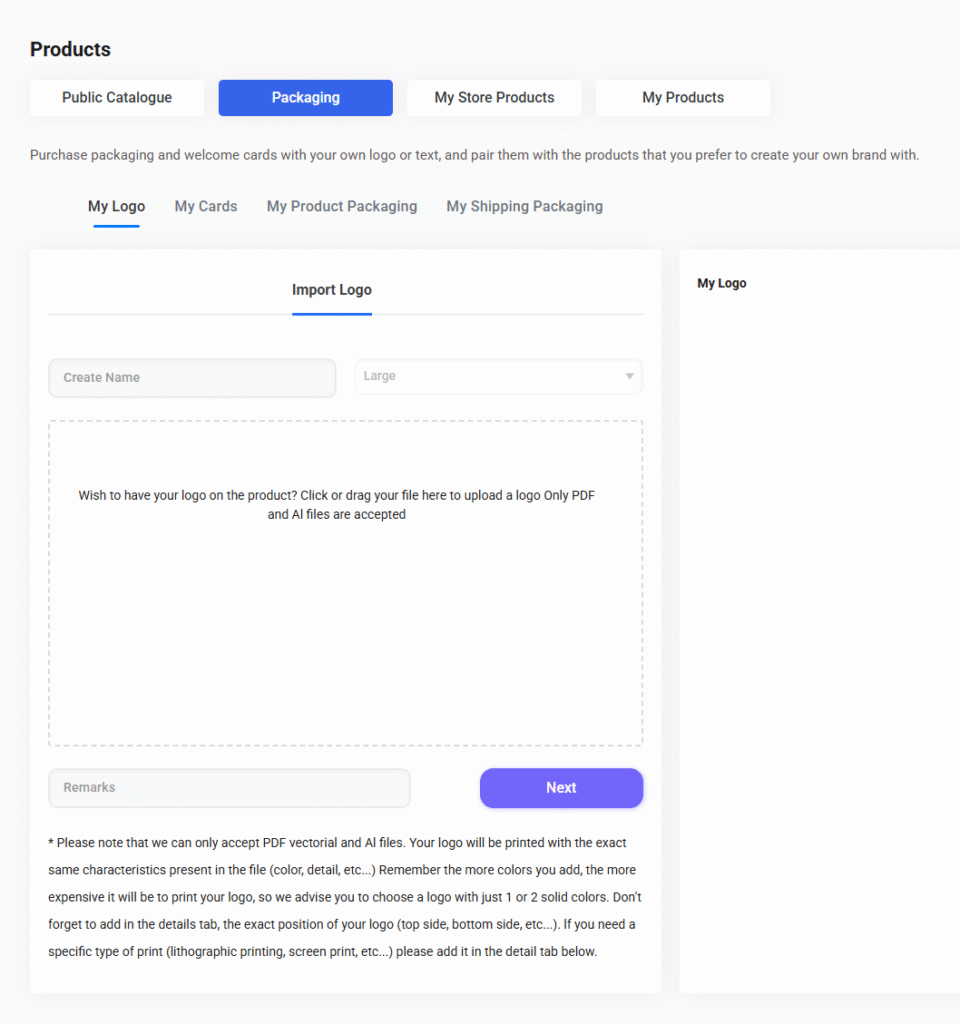
How to Submit Your Logo or Branding Assets
Follow these steps in your Ship To The Moon dashboard:
Step 1: Go to Products → Packaging
In your left sidebar, navigate to:
Products → Packaging → My Logo / My Cards / My Product Packaging / My Shipping Packaging
Each tab allows you to upload different branding assets.
Step 2: Upload Your File
Inside the “Import Logo” area, click or drag your file into the upload box.
Supported formats:
- PDF (vector)
- AI (Adobe Illustrator)
Vector files are required to make sure your logo prints clearly and accurately.
Step 3: Add a Name & Remarks (Optional)
You may include:
- Asset name (for internal identification)
- Printing instructions (position, size, orientation, etc.)
If you require a specific printing method (e.g., UV printing, screen printing, lithography), please specify it in the remarks section.
Step 4: Submit for Review
After submission, your design will be reviewed by the branding team.
If any clarification is needed, our team will contact you before production begins.
Tips for Best Results
- Use simple logo designs (1–2 colors recommended)
More colors = higher printing cost and longer production times. - Confirm print position clearly.
Example: “Top side of box, centered, 3 cm width.” - Avoid raster images (PNG, JPG).
Pixel-based files may print blurry; vector files ensure sharp results. - Match your branding across logo, cards, and packaging.
This creates a consistent brand identity.
How Private Label Works with Ship To The Moon
For fully customized product development, Ship To The Moon offers extended private label support, including:
- Custom molds
- Custom packaging structures
- Color customization
- Branded inserts
- Full product and packaging branding
To begin, submit a sourcing request or contact your account manager.
Can Branding Be Applied to Every Product?
Most products support logo printing or branded packaging — but not all materials or surfaces are suitable.
To check if a specific item can be customized:
- View the product details page
- Or ask your account manager
- Or submit your logo and the team will evaluate feasibility
Our team will confirm feasibility before production.
FAQ
-
How long does product branding take?
Production typically takes 3–20 days, depending on product type. Private label projects may require additional time.
-
Are there extra fees for custom packaging?
Yes, pricing depends on printing method, color count, and quantity. A quotation will be provided after design review.
-
Can I update or replace my logo later?
Yes. You can upload updated branding assets at any time through the dashboard.