Launch your dropshipping journey today – Your first sale is closer than you think!

Joining our Affiliate Program is free and automatic once you create a Ship To The Moon (STTM) account. Here’s how:
Step 1: Create an STTM Account
If you haven’t already, sign up for an STTM account. During registration, you’ll provide basic info (name, email, mobile, etc.)—no additional steps for the affiliate program.
Step 2: Access the Affiliate Dashboard
- Log in to your STTM dashboard.
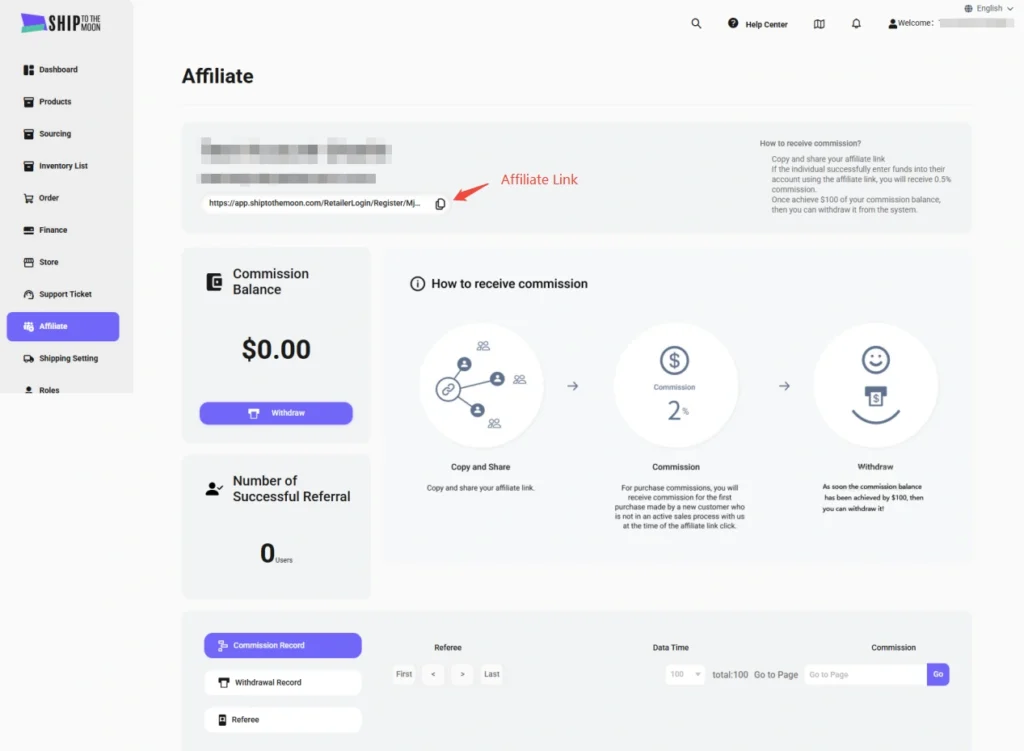
- In the left sidebar, click Affiliate.
Step 3: Get Your Unique Affiliate Link
On the Affiliate page:
- Locate your personalized affiliate link (e.g.,
https://app.shiptothemoon.com/RetailerLogin/Register/MjA2MTA...). - Click the copy icon to save the link (share it via social media, blogs, emails, or other channels).
Step 4: Share & Earn Commissions
When someone signs up for STTM using your affiliate link and funds their account, you earn a commission.
Step 5: Withdraw Your Earnings
Once your Commission Balance reaches $100, click the Withdraw button on the Affiliate page to request a payout.
Key Notes
- Automatic Enrollment: Creating an STTM account automatically enrolls you in the Affiliate Program—no separate application.
- Commission Details: Earn 2% commission on qualifying actions (see the dashboard for up-to-date rates).
- Tracking: The dashboard tracks your referrals, commissions, and withdrawal history in real time.
For help, use the live chat feature in your dashboard or email [email protected].