Launch your dropshipping journey today – Your first sale is closer than you think!

Withdrawing affiliate commissions from Ship To The Moon is simple. Follow these steps:
Step 1: Check Your Commission Eligibility
- Log in to your Ship To The Moon dashboard.
- Navigate to the Affiliate tab (left sidebar).
- Verify your Commission Balance meets the minimum threshold of $100.
Step 2: Submit a Withdrawal Request
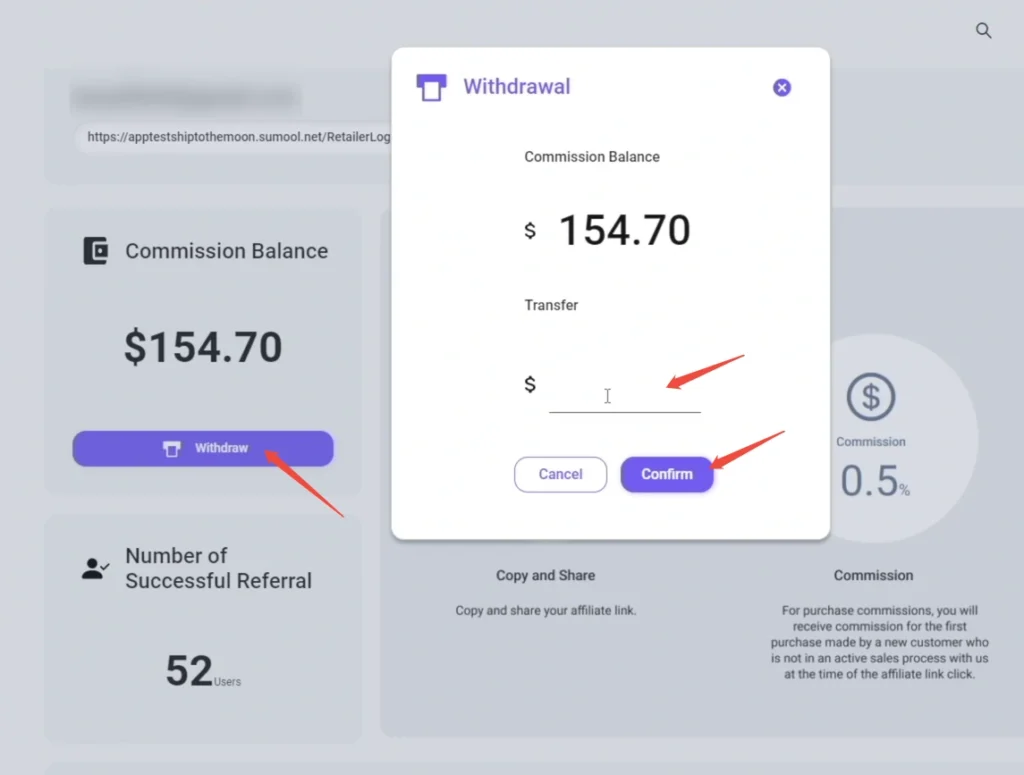
- Click the Withdraw button below your Commission Balance.
- In the pop-up, confirm your payment details.
- Submit the request.
Step 3: Track Your Withdrawal Status
- Return to the Affiliate page and scroll to the Withdrawal Record section.
- View the status:
- “Pending”: Request is being processed.
- “Paid”: Funds have been sent to your account.
Key Details:
- Processing Time: Allow 3–5 business days for funds to arrive (varies by payment method).
- Threshold: Commissions below $100 cannot be withdrawn—keep growing your referrals!
- Issues? If stuck (e.g., errors, delays), email
[email protected]with your withdrawal ID.
Cash out your hard-earned commissions hassle-free—focus on growing your referrals, and we’ll handle the rest!