Launch your dropshipping journey today – Your first sale is closer than you think!

Yes – if you mean product and packaging branding. Ship To The Moon fully supports product branding, including White Label and Private Label customization. Whether you want to upload your own logo, create branded cards, design product packaging, or customize shipping packaging, the entire process can be completed directly inside your dashboard under the Products → Packaging section.
This guide walks you through what can be customized, what files you need, how to submit your designs, and what to expect during the printing and production process.
What Can You Customize for Product Branding?
The system of Ship To The Moon currently supports four types of branding assets:
1. My Logo
Add your brand logo to supported products or packaging.
2. My Cards
Upload “Thank you” cards, inserts, instructions, or promotional cards for your orders.
3. My Product Packaging
Create custom boxes, pouches, wraps, or labels for your products.
4. My Shipping Packaging
Customize outer packaging such as envelopes or shipping bags (depending on availability).
You can upload your design once and use it across different orders and products.
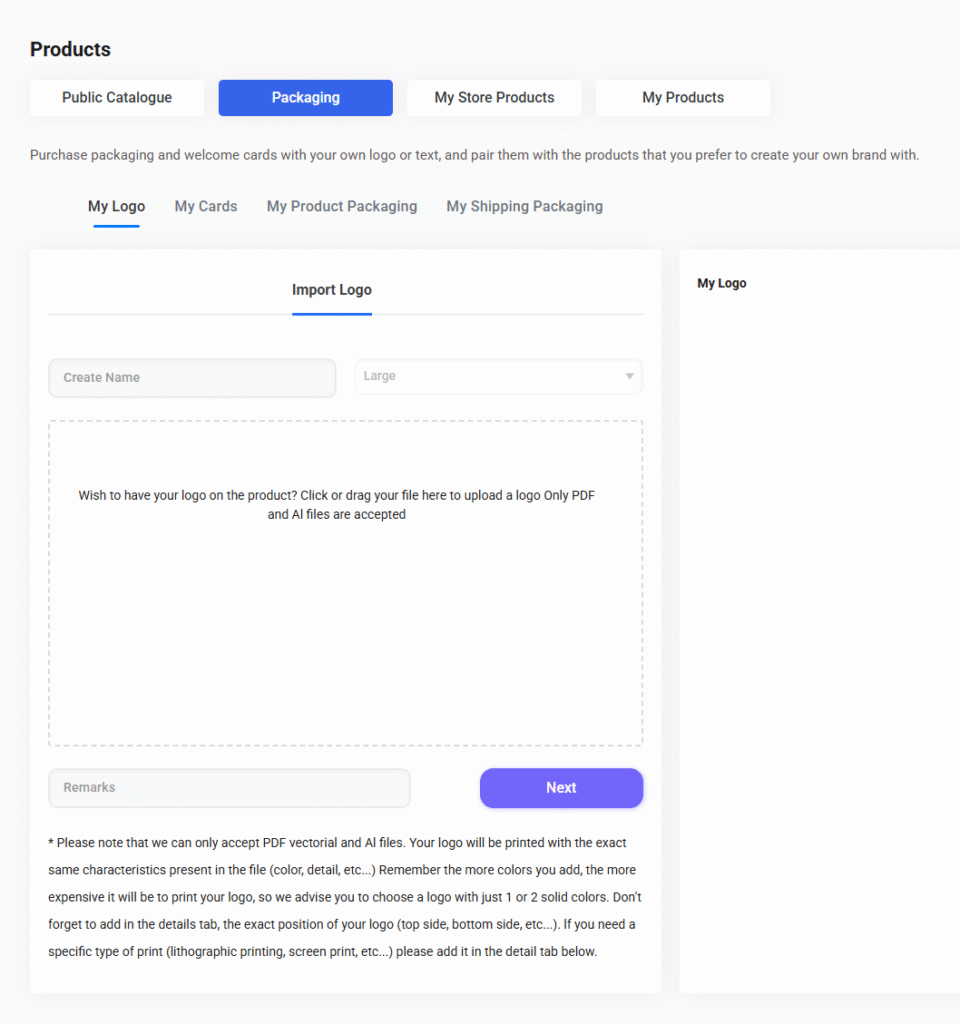
How to Submit Your Logo or Branding Assets
Follow these steps in your Ship To The Moon dashboard:
Step 1: Go to Products → Packaging
In your left sidebar, navigate to:
Products → Packaging → My Logo / My Cards / My Product Packaging / My Shipping Packaging
Each tab allows you to upload different branding assets.
Step 2: Upload Your File
Inside the “Import Logo” area, click or drag your file into the upload box.
Supported formats:
✔ PDF (vector)
✔ AI (Adobe Illustrator)
Vector files are required to make sure your logo prints clearly and accurately.
Step 3: Add a Name & Remarks (Optional)
You may add:
- A name for this logo or design
- Special instructions (positioning, color notes, print direction, etc.)
If you need a specific type of printing—lithographic, screen printing, UV print—simply describe it in the remarks.
Step 4: Submit & Wait for Confirmation
Once you click Next, your design will be reviewed by the branding team. If anything needs clarification, they’ll contact you before production begins.
Tips for Best Results
- Use simple logos (1–2 solid colors).
More colors = higher printing cost and longer production times. - Confirm print position clearly.
Example: “Top side of box, centered, 3 cm width.” - Avoid raster images (PNG, JPG).
Pixel-based files may print blurry; vector files ensure sharp results. - Match your branding across logo, cards, and packaging.
This creates a consistent brand identity.
How Private Label Works with Ship To The Moon
If you are looking to develop a fully custom-branded product, Ship To The Moon’s sourcing and branding teams can help with:
- Custom molds
- Custom packaging structures
- Color changes
- Custom inserts
- Full brand identity on the product and packaging
To start, simply submit a sourcing request or talk to your account manager.
Can Branding Be Applied to Every Product?
Most products support logo printing or branded packaging — but not all materials or surfaces are suitable.
To check if a specific item can be customized:
- View the product details page
- Or ask your account manager
- Or submit your logo and the team will evaluate feasibility
FAQ
How long does product branding take?
Typically 3–20 days depending on the item. Full private label projects may take longer.
Are there extra fees for custom packaging?
Yes, pricing depends on printing method, color count, and quantity. You’ll receive a quote after submitting your design.
Can I update or replace my logo later?
Yes. You can upload new versions anytime in the same dashboard section.